Rodin Smart Low-Poly
RAW output from Rodin can run past 10 million polygons - great for a still render, unusable for rigging. Smart Low-Poly rebuilds that mesh face by face into a clean, mostly-quad cage in the 4K-50K range, so the model is ready for animation and real-time engines without a manual retopology pass.
Dense mesh in, animation-ready mesh out
Every Rodin generation starts as a RAW mesh - dense, detailed, and built for visual fidelity rather than for a rig. Left as-is, a RAW export can carry more than 10 million polygons, which is fine for a hero render or a 3D print but unworkable for a character that needs to deform, or an asset that needs to hit a real-time frame budget.
Smart Low-Poly is Rodin's answer to that gap: switch topology mode before export and the same generation gets reconstructed into roughly 4,000 to 50,000 faces, predominantly quads, sized to the complexity of the model. It sits alongside the Gen-2.5 generation pipeline as a topology option, not a separate generation - the geometry you already generated is what gets reconstructed, nothing is regenerated from scratch.
Autoregressive, face-by-face reconstruction
Not decimation
Ordinary decimation just strips polygons from the existing mesh
Built incrementally
The surface is rebuilt face by face, each one informed by its neighbors
Cleaner quad flow
Avoids the uneven triangles decimation leaves in curved areas
Complexity-aware
Face count lands where the shape needs it, not a fixed target
The practical result: less manual cleanup before a model is rig-ready, compared to running a generic decimate modifier over RAW output yourself.
Five steps, RAW to rig-ready
- Generate the model normally, from a text prompt or a reference image - Smart Low-Poly applies to output from either path.
- Review the RAW result. Check that the shape and proportions are right before spending time on topology decisions.
- Switch topology mode to Smart Low-Poly if the asset is headed into rigging, animation, or a real-time engine.
- Export via GLB or FBX, the formats best suited for carrying quad topology into a DCC tool or game engine.
- Import into your rigging tool or engine - Blender, Unity or Unreal via Rodin's official plugins, or any tool that reads GLB/FBX.
Which topology mode for which job
| Criterion | RAW | Smart Low-Poly |
|---|---|---|
| Face count | Up to 10M+ | ~4,000-50,000 |
| Topology | Triangle-based | Mostly quad |
| Best for | Still renders, 3D printing | Rigging, animation, real-time |
| Plan access | All tiers, including Free | Creator plan or higher |
Planning a print instead of a rig? RAW is the right call - see the 3D printing guide for the full printability checklist and format notes.
Where Smart Low-Poly earns its keep
Game & real-time assets
Meshes that need to hit an engine's frame budget
Character rigging & animation
A clean quad cage that deforms predictably when rigged
Mobile & AR
Lightweight enough for on-device rendering constraints
Batch production
Consistent, predictable file sizes across an asset library
Building for a game project specifically? The game development workflow guide walks through where Smart Low-Poly fits in a full production pipeline.
Not on the Free tier
Smart Low-Poly requires a Creator plan or higher. The Free plan still gives you RAW output and the standard Quad/Triangle topology modes, so you can evaluate Rodin's generation quality without paying - but the autoregressive reconstruction itself is a paid-tier feature.
Full tier breakdown and current pricing is on the pricing page; for a broader look at what each plan unlocks beyond topology, see how to use Rodin and is Rodin AI worth it.
Smart Low-Poly walkthroughs
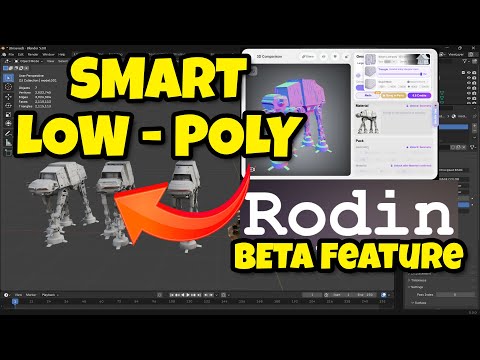
Every Rodin guide on rodin3ds.com
Topology & export
Getting started
Reviews & comparisons
Smart Low-Poly: frequently asked questions
What does Rodin's Smart Low-Poly feature actually do?+
It reconstructs the dense RAW mesh Rodin generates (up to 10M+ polygons) into animation-ready geometry with roughly 4,000 to 50,000 faces, mostly quads, suitable for rigging and real-time engines - without you doing a manual retopology pass.
How is Smart Low-Poly different from ordinary decimation?+
Standard decimation just removes polygons from the existing mesh, which tends to leave uneven triangles in curved areas. Smart Low-Poly rebuilds the surface autoregressively, face by face, with each new face informed by the surrounding geometry, which produces cleaner quad flow than simple polygon reduction.
What plan do I need for Smart Low-Poly?+
Creator plan or higher. It isn't included on the Free tier, which gives you RAW and standard Quad/Triangle topology but not the Smart Low-Poly reconstruction.
When should I use RAW instead of Smart Low-Poly?+
RAW is better for still renders and 3D printing, where you want maximum surface detail and don't need a clean, animatable quad cage. Smart Low-Poly is the better choice whenever the model is headed into rigging, animation, or a real-time engine.
Does Smart Low-Poly work on any generated model?+
Yes - it applies to output from both text-to-3D and image-to-3D generation. You generate the model first, review the RAW result, then switch topology to Smart Low-Poly before exporting if the asset needs to be rigged, animated, or used in a real-time engine.